Content calendar, planning, content tools,
Source

Whether you’re an experienced content creator or just starting, having an organized content calendar can be your secret weapon for staying on track, engaging target audiences and achieving goals. Imagine having a roadmap guiding you through all the content possibilities, ensuring you never miss a beat and ideas come to life at just the right times! That’s what a content calendar provides. This is a plan for your journey in creating content. It’s like putting together a puzzle where each piece represents a blog, video or other format, and together they create an impactful storyline which resonates with readers. Let’s take a look at how to craft an effective calendar that keeps your content fresh, engaging and aligned with your brand or business.

Importance of a Content Calendar

So, why is a content calendar important? An effective content calendar can act as a guiding light for you, showing the path for organized content management. This essential tool serves as a compass directing your efforts to ensure smooth sailing from idea to published content. With endless digital possibilities, a well-structured calendar can signify consistency, strategy and success.

Imagine having all your content neatly mapped out, scheduled and ready to create and share – from blog posts to social media to emails. A content calendar is more than a to-do list, it’s a strategic framework empowering you to maximize creativity and resources.

Studies show those following a content calendar have a 60% higher chance of success in their content marketing efforts. With proper planning and direction, a calendar smoothens

the process to reach goals through consistency in your message and formats.

Steps to Create a Content Calendar

Designing a content calendar is like creating a roadmap for your content journey. Follow these steps:

Step 1: Analyze your Past Performance

Before starting, review past content performance. Identify what worked well, resonated with readers, and fell short. These insights inform future planning.

Step 2: Choose your Content Type

Content comes in many forms from blogs to videos to social media. Determine which align with your goals and audience interests. For example, do readers prefer blogs or visual content? Tailor types accordingly.

Step 3: Research Keywords and Generate Ideas

Keywords are essential for discovery. Research topics people search for in your niche. Brainstorm ideas revolving around these keywords that provide value and meet audience needs.

Step 4: Select the Right Platform

Selecting the right calendar platform is important. Consider budget, team size and features needed. Choose a specialized tool or spreadsheet suited to your requirements.

Step 5: Detail Calendar Components

Customize calendar entries. Include author, deadlines, publish dates, platforms and asset links. This comprehensive approach accounts for all parts of creation.

Step 6: Create an Asset Library

Organization boosts efficiency. Set up a central repository for easy access and sharing of creative assets among team members to expedite production.

Step 7: Develop a clear Workflow

Efficient creation relies on a clear workflow. Establish an ideation, development, approval and distribution process. Define roles and responsibilities for a smooth journey from concept to publication.

Step 8: Bring Ideas to Life

With calendar and workflow ready, bring ideas to life. Produce engaging, brand-aligned content and share consistently as planned across selected platforms.

Tools for Content Calendar Creation

Here are some content tools to help yourself with content calendar creation:

1. HubSpot’s Excel Template

A free, simple option ideal for beginners. HubSpot’s template allows organizing content in a basic but effective Excel spreadsheet. It gets the job done.

2. Google Drive

Great for collaboration. Google Drive provides free templates and allows easily sharing calendars with your team for editing. Everyone stays connected.

3. Trello

Perfect for visual thinkers. Trello combines task management with planning. It offers calendar views alongside collaborative features in a user-friendly interface.

4. Evernote

More than note-taking, Evernote helps organize tasks, ideas and assets. It’s a comprehensive solution to streamline ideation, planning and streamlining content production.

All these platforms offer tailored features for organization. The HubSpot and Google templates provide basic solutions at no cost, while Trello and Evernote integrate additional functionalities for visual and collaborative task management throughout the creative process.

Content calendar, planning, content tools
Source

Tracking and Adjusting Your Content Calendar

Here are some tips for tracking and adjusting your content calendar:

Regularly assess how your content is doing using analytics. You should take a look at what topics resonate and which underperform to make data-driven decisions for your content.

Be adaptable to changes in life, trends and audience preferences. Leave room to modify the calendar.

Actively ask your readers what else they want to see. Their input can actually guide you to keep content relevant!

Try new ideas like different formats, times or platforms. Innovation will keep your content fresh and engaging for your readers.

Conclusion

Connect with us for our guidance that can transform your brand’s presence. Now, you can master content planning too! A content calendar is more than a simple planning tool – it’s a strategic partner in the content creation process. Ensure the success of your online presence by following the steps above and use the appropriate platforms and tools you can find. Success is in the details, and a content calendar may assist you by implementing a strategic, valuable plan. So, with careful planning and organization, your content or business will resonate powerfully with your audience!

FAQ

What is a content calendar, and why is it important?

A content calendar is a strategic planning tool that helps creators organize, schedule, and manage content across different platforms. It ensures consistency, aligns content with business goals, and improves efficiency by mapping out ideas in advance.

What are some useful tools for content calendar management?

Popular tools include:
HubSpot’s Excel Template – A free spreadsheet template for beginners
Google Drive – Cloud-based collaboration for teams
Trello – A visual task management tool with calendar features
Evernote – A note-taking and organization tool for planning content

How do I track and adjust my content calendar?

Regularly review analytics to assess performance, adapt to trends and audience preferences, seek feedback from your audience, and experiment with different formats, posting times, and platforms to keep content engaging and relevant.
Leave a Reply

Your email address will not be published. Required fields are marked *

Start your Project Today!

Tell us about your goals—we’ll craft a strategy that delivers real results.

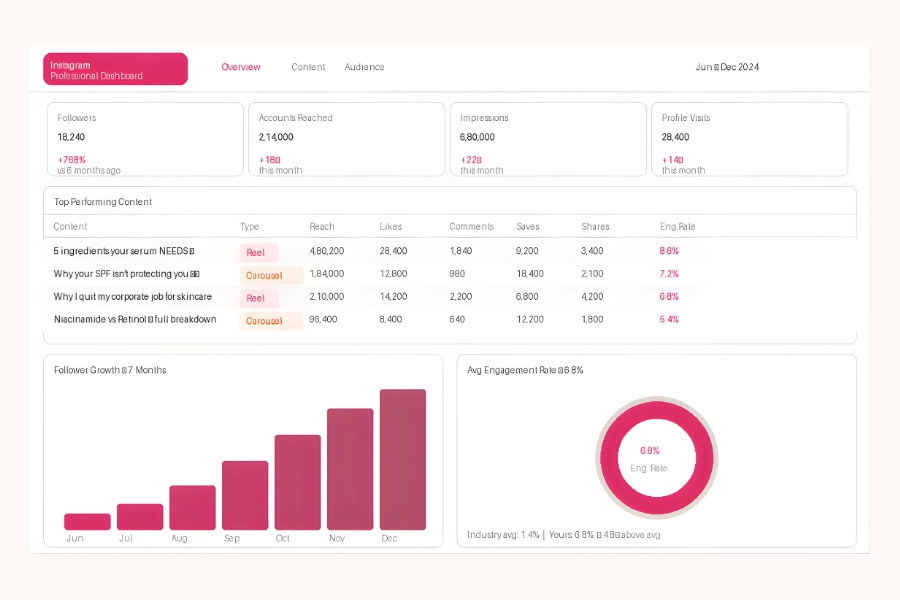
Zero to 18K: Building Petal's Community-First Instagram

From a brand nobody had discovered to a community people were recommending to their friends.

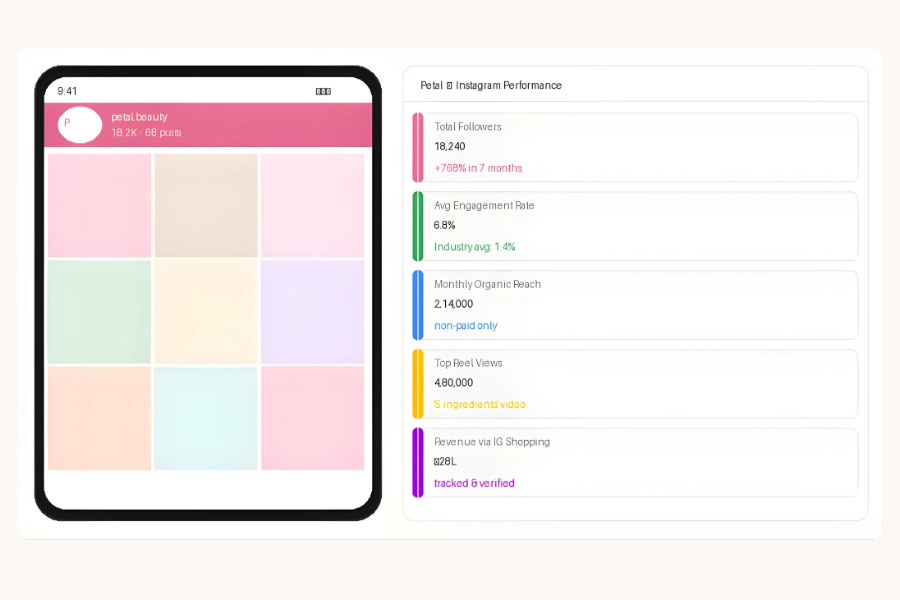
18.2K

INSTAGRAM FOLLOWERS

6.8%

AVG ENGAGEMENT RATE

₹28L

REVENUE VIA IG SHOPPING

7 Months

TIMELINE

01 · CLIENT OVERVIEW

Who We Worked With

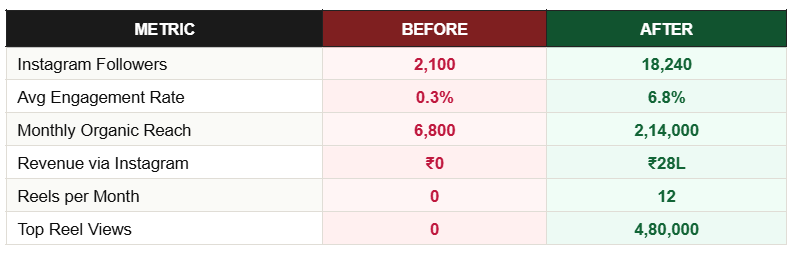
Petal is an indie beauty startup — two founders, clean ingredients positioning, genuinely excellent products, and essentially no marketing. They had 2,100 followers when we started, near-zero reach, and a founder posting inconsistently whenever she found time. The products had earned 4.8-star reviews but nobody outside their immediate circle had heard of the brand.

02 · PROBLEM STATEMENT

What Wasn't Working

The brand had no content identity, no posting system, and no strategy connecting social media to sales. What posts did exist were flat-lay product images that looked identical to every other indie beauty brand. The founder had no time, no brief, and no creative framework. There was no link-in-bio strategy and Instagram Shopping wasn't set up.

03 · STRATEGY

How We Thought About It

We repositioned Petal from 'product showcase' to 'ingredient intelligence meets real-woman narrative.' The insight: conscious beauty buyers research before they buy. They want to understand what's in the bottle, why it works, and whether the brand is run by people who actually care. Education-first content builds that trust without ever selling. We used a 3-pillar system: Ingredient Intel, Real Skin Stories, and The Formula.

Beauty is a high-trust, high-consideration category. A follower who saves your 'Why niacinamide at 5% works' post has spent 40 seconds thinking about your product. That's 40 seconds of unprompted consideration you didn't pay for. Saves are the highest-intent action on Instagram and extend organic reach algorithmically. Teaching is the most efficient form of selling.

04 · EXECUTION

Step-by-Step Breakdown

05 · TOOLS USED

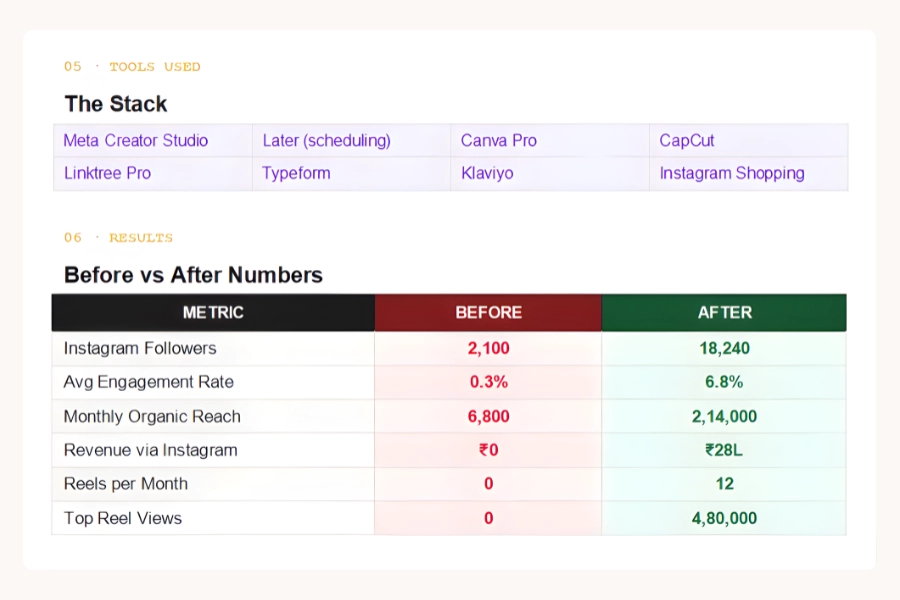
The Stack

06 · RESULTS

Before vs After Numbers

Petal Results

◈ Portfolio Design Directions (For Behance / Designer)

07 · KEY TAKEAWAYS

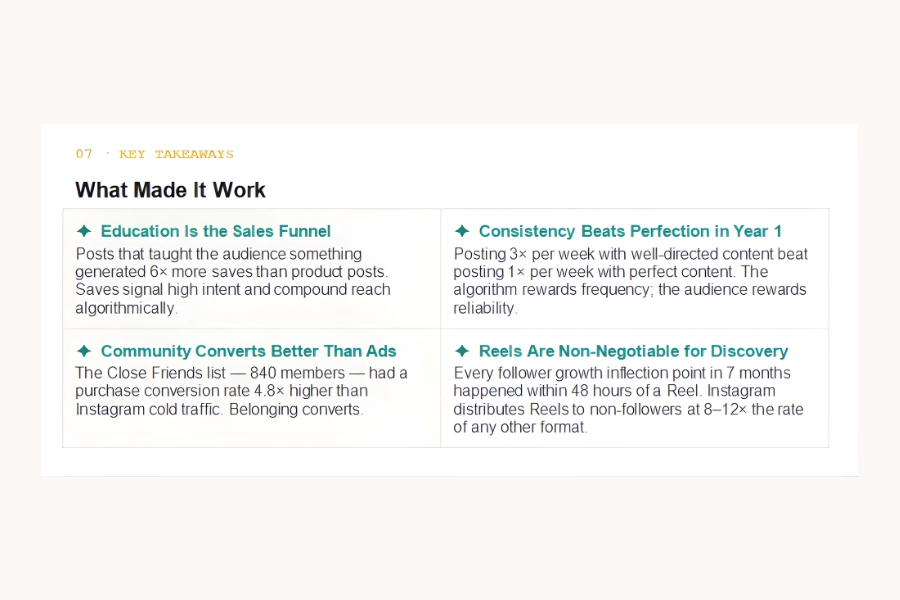
What Made It Work

Posts that taught the audience something generated 6× more saves than product posts. Saves signal high intent and compound reach algorithmically.

Posting 3× per week with well-directed content beat posting 1× per week with perfect content. The algorithm rewards frequency; the audience rewards reliability.

The Close Friends list — 840 members — had a purchase conversion rate 4.8× higher than Instagram cold traffic. Belonging converts.

Every follower growth inflection point in 7 months happened within 48 hours of a Reel. Instagram distributes Reels to non-followers at 8–12× the rate of any other format.

Screenshots

Want Results Like These?

Want to build a social media presence that earns trust, builds community, and converts?

The ₹1.8Cr Funnel Audit: How Forge Stopped Leaking Revenue

The traffic was never the problem. The funnel was the problem — and it was haemorrhaging at every single stage.

₹1.8Cr

ANNUAL REVENUE RECOVERED

+280%

CHECKOUT CONVERSION

−42%

CART ABANDONMENT

6 Weeks

TIMELINE

01 · CLIENT OVERVIEW

Who We Worked With

Forge is a funded D2C nutrition brand — protein supplements, health snacks, electrolyte drinks — spending ₹5Cr/month on paid acquisition. Strong brand awareness, high repeat purchase rate, but conversion benchmarks consistently 35–40% below category averages. The CEO knew there was leakage — just not where.

02 · PROBLEM STATEMENT

What Wasn't Working

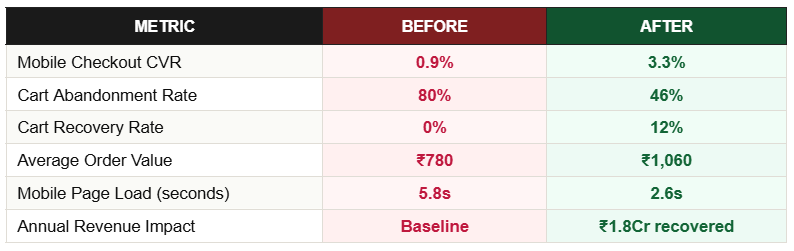
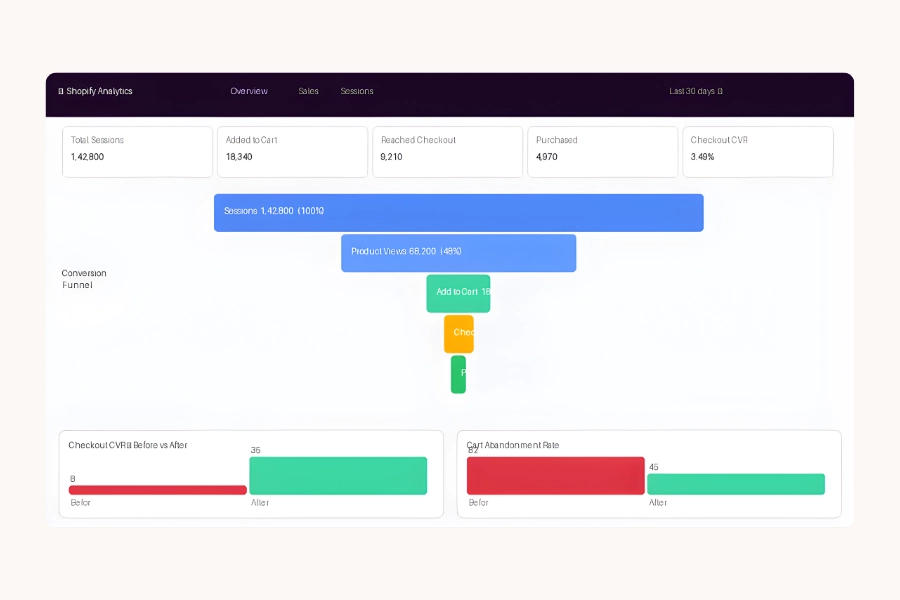
A ₹5Cr/month traffic budget was feeding a funnel that converted at 0.9% on mobile — against an industry average of 2.4%. The mobile checkout had 11 form fields. There was no cart recovery sequence. Product pages were beautiful but led with ingredient lists rather than outcomes. The brand had never run a structured CRO audit.

03 · STRATEGY

How We Thought About It

We ran a complete CRO audit before touching a single element: heatmaps to find where attention was lost, session recordings to find where users hesitated, and funnel analytics to quantify drop-off at each stage. Only after building the full picture did we prioritise fixes by impact-to-effort ratio. High-impact, low-effort changes first. A/B tests on every significant change before full rollout.

At ₹5Cr monthly ad spend, even a 0.5% improvement in checkout conversion rate generates significant incremental monthly revenue — with no additional acquisition cost. Funnel optimisation at scale has the highest ROI of any marketing activity. The traffic is already paid for.

04 · EXECUTION

Step-by-Step Breakdown

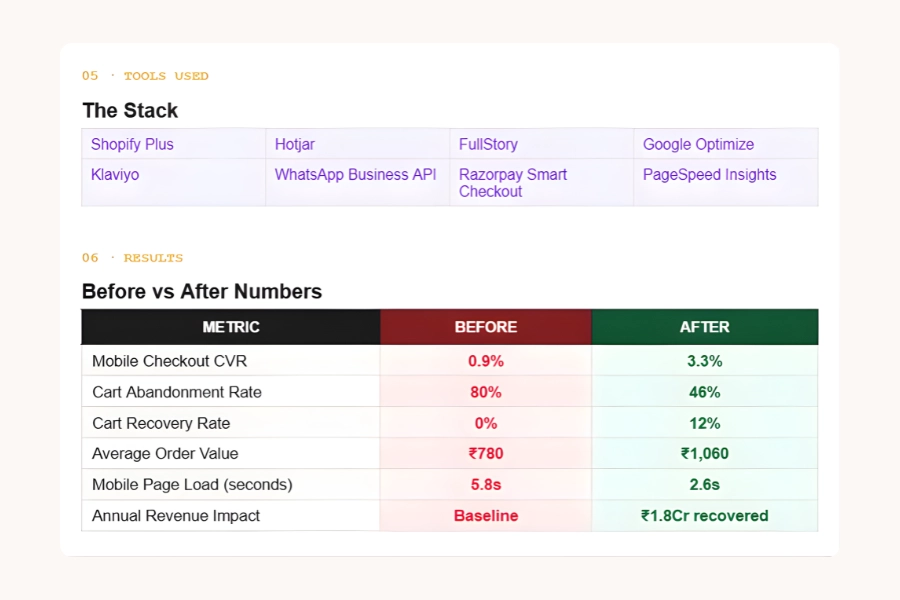
05 · TOOLS USED

The Stack

06 · RESULTS

Before vs After Numbers

Forge Results

◈ Portfolio Design Directions (For Behance / Designer)

07 · KEY TAKEAWAYS

What Made It Work

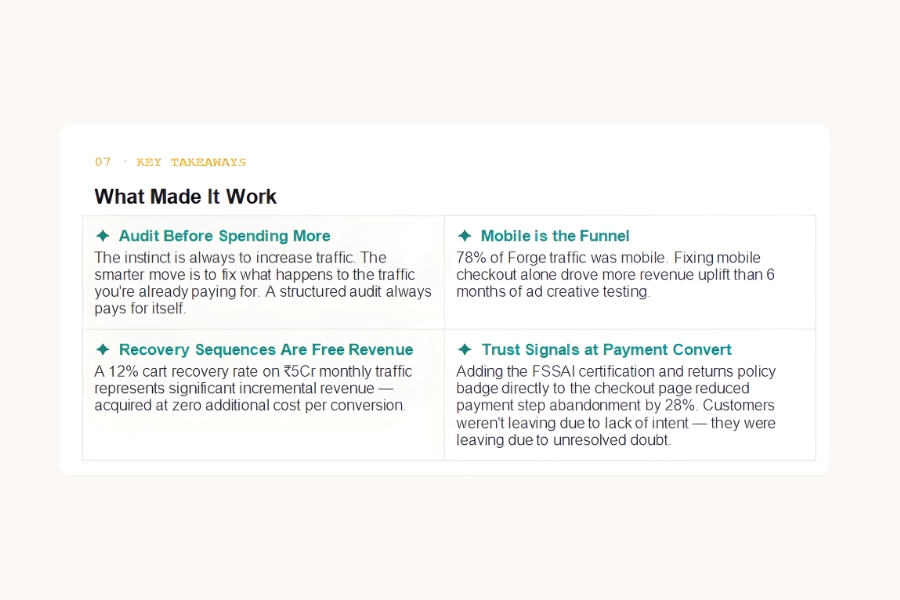
The instinct is always to increase traffic. The smarter move is to fix what happens to the traffic you're already paying for. A structured audit always pays for itself.

78% of Forge traffic was mobile. Fixing mobile checkout alone drove more revenue uplift than 6 months of ad creative testing.

A 12% cart recovery rate on ₹5Cr monthly traffic represents significant incremental revenue — acquired at zero additional cost per conversion.

Adding the FSSAI certification and returns policy badge directly to the checkout page reduced payment step abandonment by 28%. Customers weren't leaving due to lack of intent — they were leaving due to unresolved doubt.

Screenshots

Want Results Like These?

Want us to audit your funnel and find the revenue that's already in your traffic?

The B2B Lead Machine: 48 Qualified Leads/Month for Velo

We stopped paying for traffic from students. We started paying for pipeline from decision-makers.

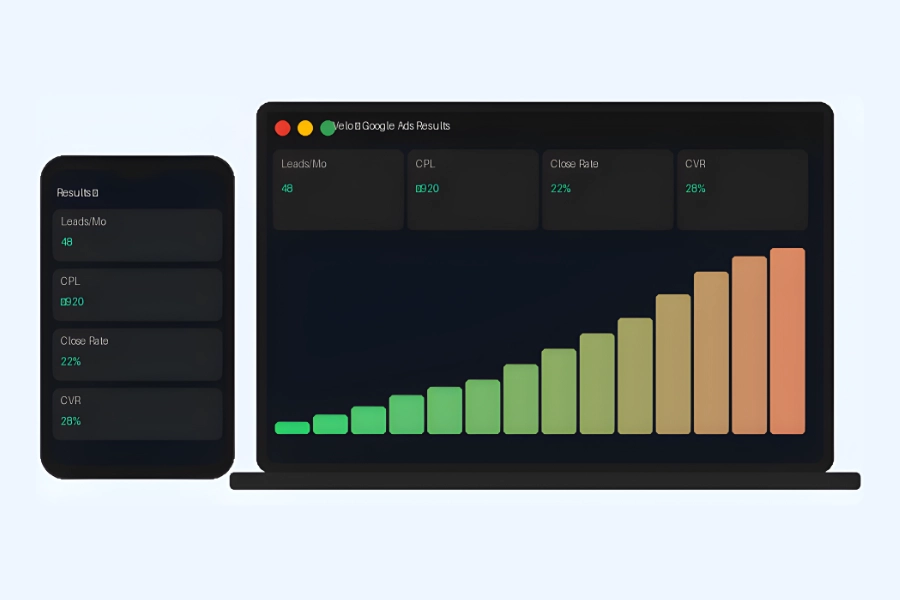
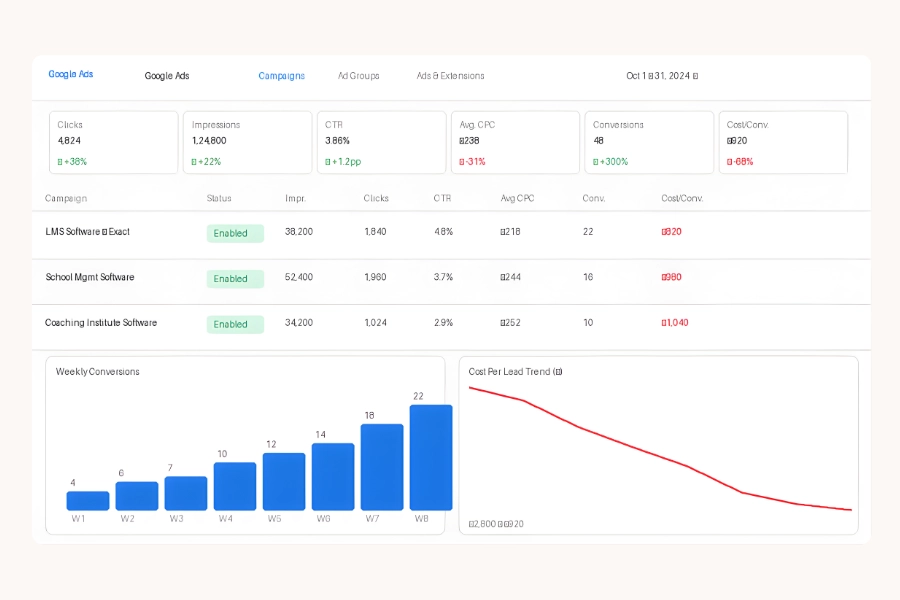
48

QUALIFIED LEADS / MONTH

₹920

COST PER LEAD

4x

LEAD VOLUME GROWTH

60 Days

TIMELINE

01 · CLIENT OVERVIEW

Who We Worked With

Velo is a B2B EdTech SaaS providing LMS and school management software to K–12 schools and coaching institutes across India. Series-A stage with a 4-person sales team. They were generating MRR but leaking heavily on acquisition — each qualified lead was costing far more than it should, and most leads weren't qualified at all.

02 · PROBLEM STATEMENT

What Wasn't Working

The Google Ads account was running broad-match keyword campaigns that were attracting students searching for study materials and tutoring — completely different from Velo's ICP of institute owners and school principals. Their landing page had no form above the fold, a generic 'Learn More' CTA, and a 5% conversion rate. Of 12 monthly leads, fewer than 4 would convert to demos.

03 · STRATEGY

How We Thought About It

Two parallel workstreams: account restructure and landing page rebuild. The core insight was that B2B buyers in EdTech need to see specific, outcome-led claims ('manage 500 students without a single spreadsheet') rather than feature lists. We restructured the campaigns to use exact and phrase match only, built ICP-specific landing pages per campaign, and connected CRM-qualified leads back to Google Smart Bidding as conversion signals.

In B2B Google Ads, message-to-market match is the primary lever. An institute owner looking for LMS software will click a generic ad — but they convert only when the landing page speaks exactly to their pain (manual fee collection, parent communication, attendance tracking). We built dedicated pages for each keyword theme with relevant outcomes front and centre.

04 · EXECUTION

Step-by-Step Breakdown

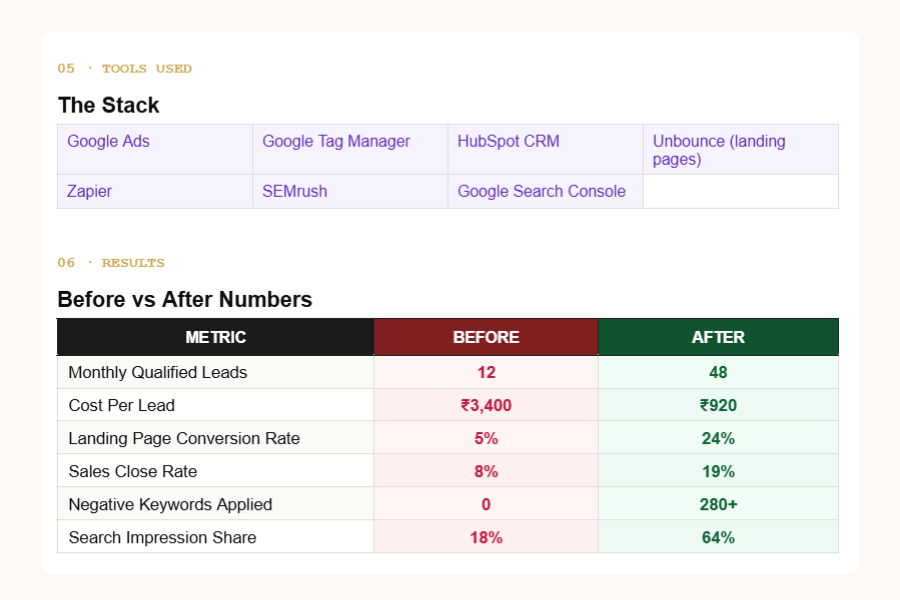
05 · TOOLS USED

The Stack

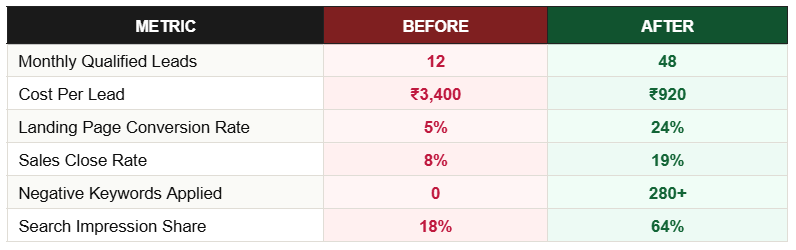
06 · RESULTS

Before vs After Numbers

Velo Results

◈ Portfolio Design Directions (For Behance / Designer)

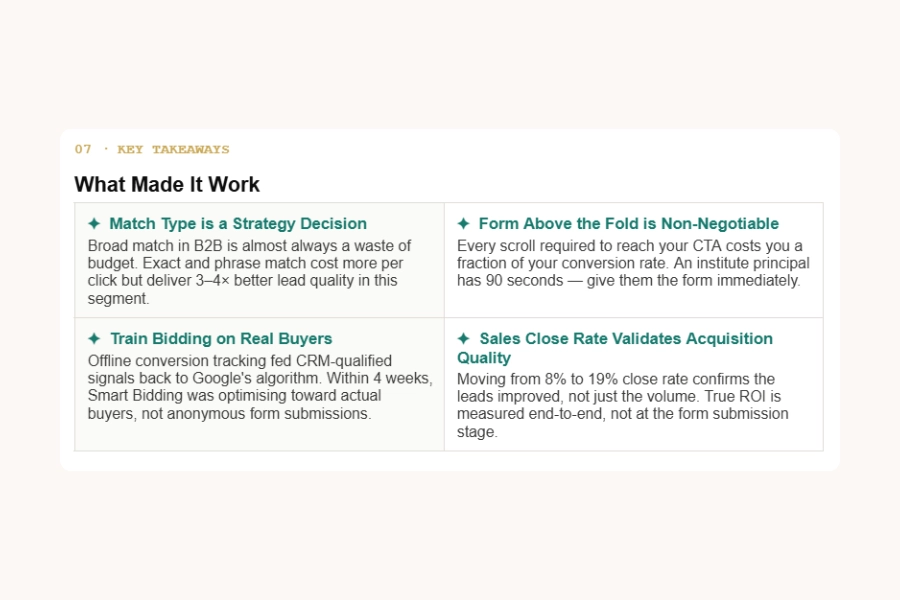
07 · KEY TAKEAWAYS

What Made It Work

Broad match in B2B is almost always a waste of budget. Exact and phrase match cost more per click but deliver 3–4× better lead quality in this segment.

Every scroll required to reach your CTA costs you a fraction of your conversion rate. An institute principal has 90 seconds — give them the form immediately.

Offline conversion tracking fed CRM-qualified signals back to Google's algorithm. Within 4 weeks, Smart Bidding was optimising toward actual buyers, not anonymous form submissions.

Moving from 8% to 19% close rate confirms the leads improved, not just the volume. True ROI is measured end-to-end, not at the form submission stage.

Screenshots

Want Results Like These?

Want us to rebuild your Google Ads account around qualified pipeline — not just traffic?

From Scroll to Sale: Rebuilding Lumis's Meta Engine

We stopped burning budget and started building a brand that actually pays for itself.

3.8x

ROAS

₹58L

PEAK REV / MONTH

−48%

COST PER ACQUISITION

11 Wks

TIMELINE

01 · CLIENT OVERVIEW

Who We Worked With

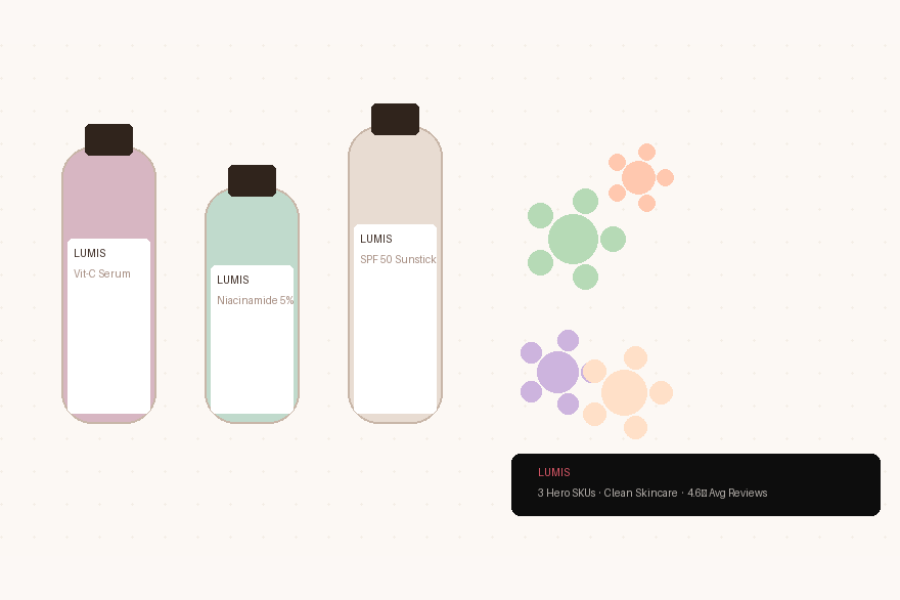
Nykora is a bootstrapped D2C skincare brand with three hero SKUs — a vitamin C serum, a niacinamide moisturiser, and an SPF sunstick — operating in the mass-premium segment. At two years old, they had strong product-market fit evidenced by 4.6-star reviews across 1,200+ orders. But they couldn't grow profitably past ₹22L/month despite steadily increasing Meta ad spend.

02 · PROBLEM STATEMENT

What Wasn't Working

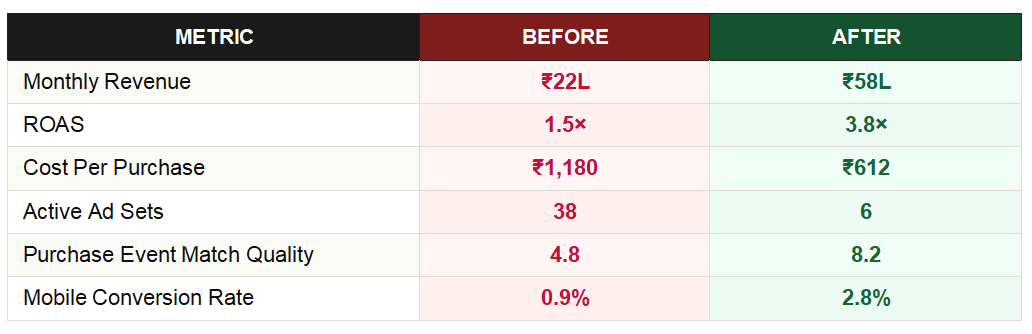
Nykora's Meta account was structurally broken before it was creatively weak. 38 ad sets ran simultaneously with no campaign organisation. Their Pixel had a purchase event misconfiguration — 40% of actual purchases went untracked. ROAS averaged 1.4–1.6×, below their breakeven of 2.2×. Every budget increase made losses worse, not better.

03 · STRATEGY

How We Thought About It

The diagnosis was structural before creative. Nykora had no working attribution, no campaign hierarchy, and no testing system. Our approach: restore tracking integrity first, then consolidate the account architecture so the algorithm receives clean signal, then build a UGC creative testing system. Scale only after all three foundations were in place.

The diagnosis was structural before creative. Nykora had no working attribution, no campaign hierarchy, and no testing system. Our approach: restore tracking integrity first, then consolidate the account architecture so the algorithm receives clean signal, then build a UGC creative testing system. Scale only after all three foundations were in place.

04 · EXECUTION

Step-by-Step Breakdown

05 · TOOLS USED

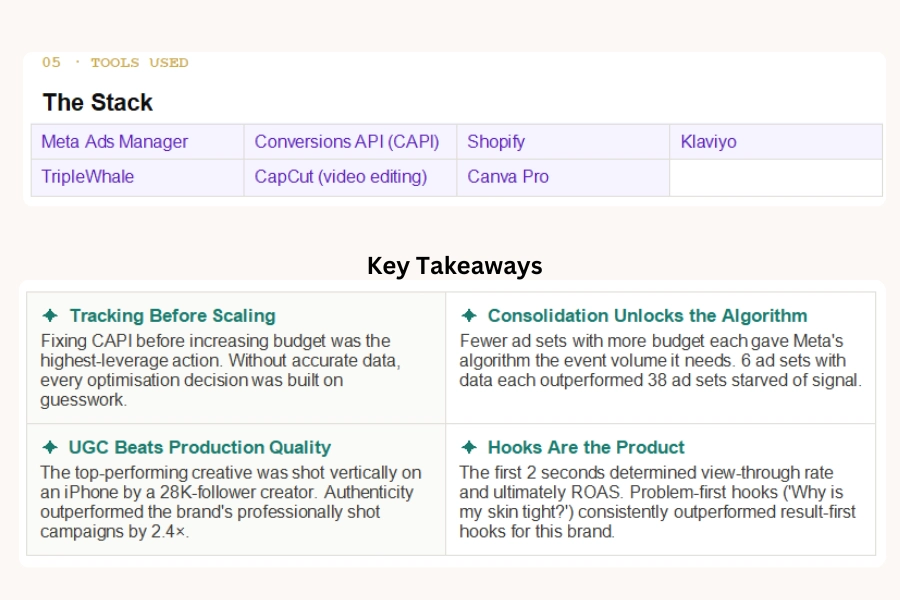
The Stack

06 · RESULTS

Before vs After Numbers

Lumis Results

◈ Portfolio Design Directions (For Behance / Designer)

07 · KEY TAKEAWAYS

What Made It Work

Fixing CAPI before increasing budget was the highest-leverage action. Without accurate data, every optimisation decision was built on guesswork.

Fewer ad sets with more budget each gave Meta's algorithm the event volume it needs. 6 ad sets with data each outperformed 38 ad sets starved of signal.

The top-performing creative was shot vertically on an iPhone by a 28K-follower creator. Authenticity outperformed the brand's professionally shot campaigns by 2.4×.

The first 2 seconds determined view-through rate and ultimately ROAS. Problem-first hooks ('Why is my skin tight?') consistently outperformed result-first hooks for this brand.

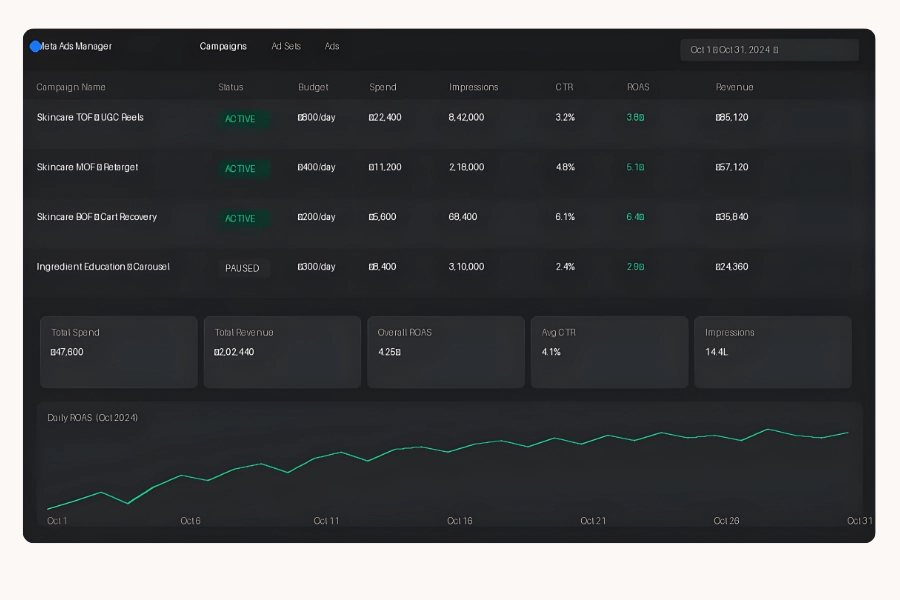
Screenshots

Want Results Like These?

Want us to audit your Meta account and rebuild it for profitable scale?